
1. Introduction to the Content Calendar 0:00
-
Sneak peek of the new admin content calendar.
-
Available in the content hub starting in the new year 2026.
- Full Video Tour
2. Purpose of the Calendar 0:10
-
Provides a visual snapshot of activities in the app, content items, and products.
-
Helps keep communications organized and the app feeling fresh.
3. Calendar Views 0:22
-
Toggle between month and week view:
-
Month View: Ideal for big picture planning.
-
Week View: Focuses on daily activities.
-
4. Calendar Tiles and Icons 0:32
-
Each tile represents an activity for that day:
-
Content Icons: Indicate items appearing in the app.
-
Bell Icons: Represent direct push notifications and content push notifications.
-
-
Each occurrence is labeled to show scheduling, publishing, or expiration.
5. Quick Preview of Content 0:56
-
Preview includes key details:
-
What the content is.
-
When it is publishing.
-
When it expires.
-
6. Editing Content 1:02
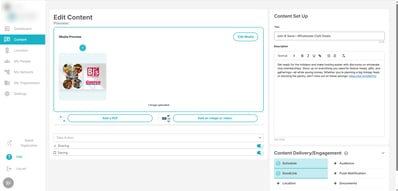
-
Click 'Edit' to jump straight into the item and make changes.
7. Creating Content 1:11
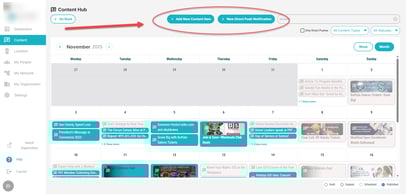
-
Create content directly from the calendar:
-
Push notifications.
-
Content items.
-
8. Goals of the Calendar 1:19
-
Helps users:
-
See upcoming content.
-
Spot any gaps and schedule accordingly.
-
Ensure timely and relevant content for followers.
-
9. Future Improvements 1:27
-
This is just the beginning of the content calendar's capabilities.
-
Continuous improvements will be made based on user feedback.
- We can wait to see how you use it in your app communications!
Got questions or feedback about the Admin Content Calendar? Reach out to appsupport@patter.com. We'd love to hear from you!